RPG Maker 2009 Ultimate
Development of this project is currently frozen!
Introduction
Patches of the RPG Maker 2000/2003 editor have always been the greatest problem, because they all changed the resource section in the executable. So there were two ways of distrubuting such a modification: Either the users had to change their RPG2000/3.exe by themselves using the famous “Resource Hacker” or replace it by a new one, which was often a big problem because modifications made in the past, and even localizations were overridden.
The aim of my project is to make things easier. RPG Maker 2009 Ultimate neither changes the executable file nor replaces it. It’s compatible with all versions and this way very flexible. When started, it will load any RPG Maker 200x editor and inject itself into it. From the inside, it is able to modify the RPG Maker then.
Already implemented features
- Interface modification: new, compact toolbar, seperated (”floating”) map tree and chip selector, project’s name in title bar
- User-defined interface modification or localization through INI files (UIMod). This replaces the old way, where you had to use Resource Hacker.
- Support for multiple instances (up to 100) without conflicts
- Opening project by entering the path
- Replacement of fonts (this way eliminating the bug where RM2k3 would display a yen sign instead of a backslash)
- “User tools” menu where you can put tools you want to call quickly
- Support for resources in subfolders
- File info for resources (image size, title/copyright information for MIDIs and MP3s, …)
- “Undo” button for many event commands
- New charset animation type “No steps when moving”
- New hotkeys, F11 can now be used in every window to open the music selector, F9 also works in the database
- Event command highlighting
- Size of event listboxes can be increased
- “Secret”, password-protected events
- Support for lower layer tiles in upper layer (with one important restriction, read ultimate.txt for details)
- Go to a map by entering its ID or a part of its name
- Support for comments up to 128 lines
- No size check at importing images
- Support for 125 (5×25) sprites instead of 25 (5×5) in one animation file
- Useful tips and tricks
- Language files included: German, French, Spanish and Polish
- Language file editor
Planned features
- Integration of CGSS
- Minimap of current map for better overview
- Better sound player with music download feature
- Debugger
- Event template feature (with parameters) for often used types of events (e.g. “chest”, “teleport”, …)
- …and much more
Screenshots
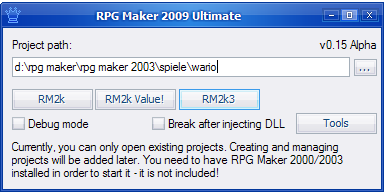
Loader
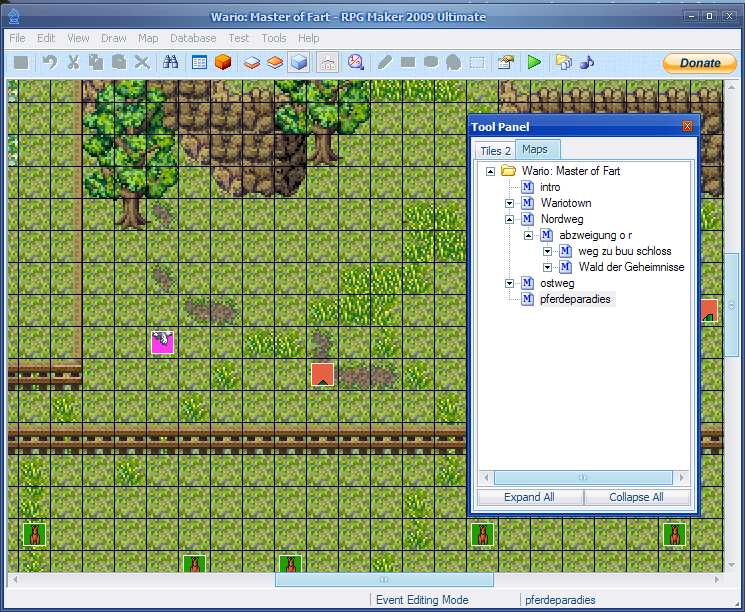
Main window with floating tool panel
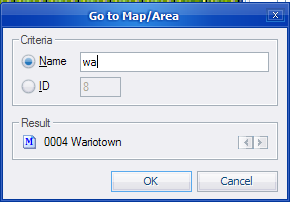
‘Go to Map’ window
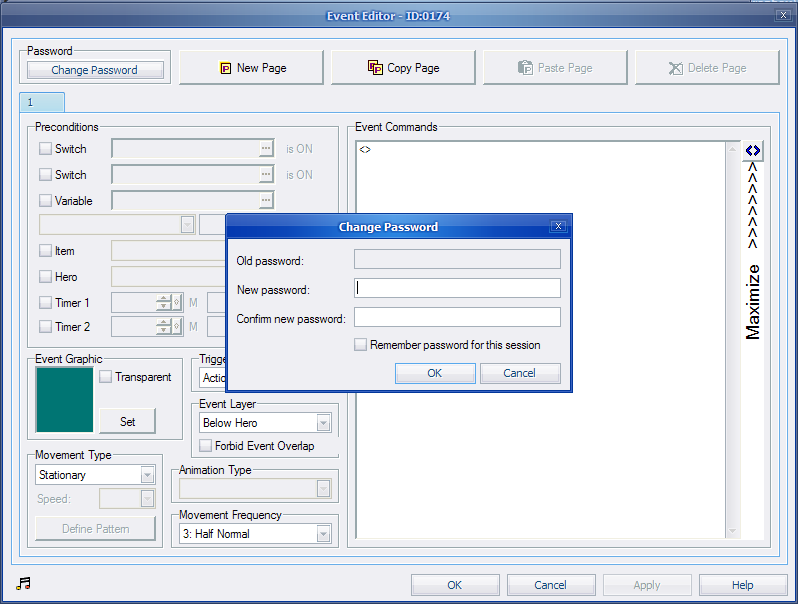
Secret event password change dialog
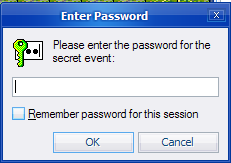
Secret event password enter dialog
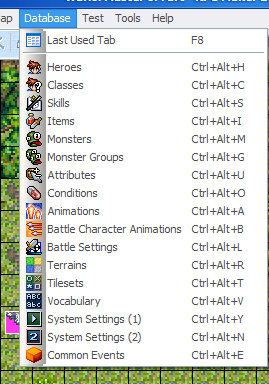
Database menu
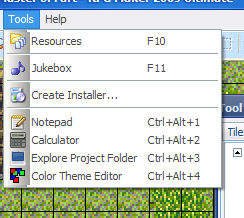
Tools menu with user-defined tools
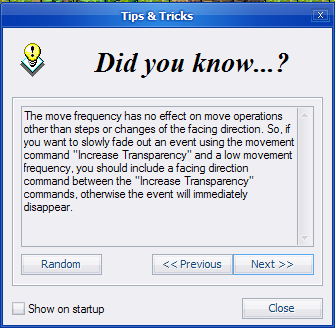
Tips & Tricks window
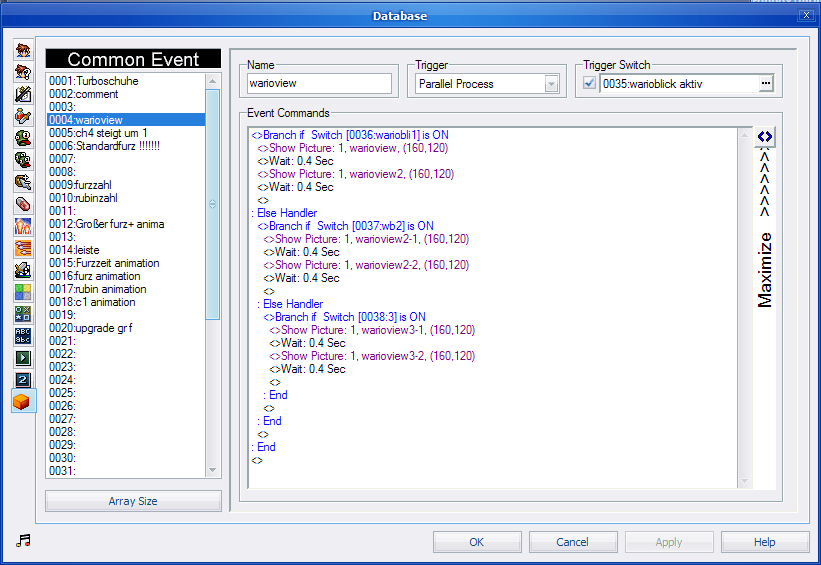
Database with vertical tabs and event command highlighting
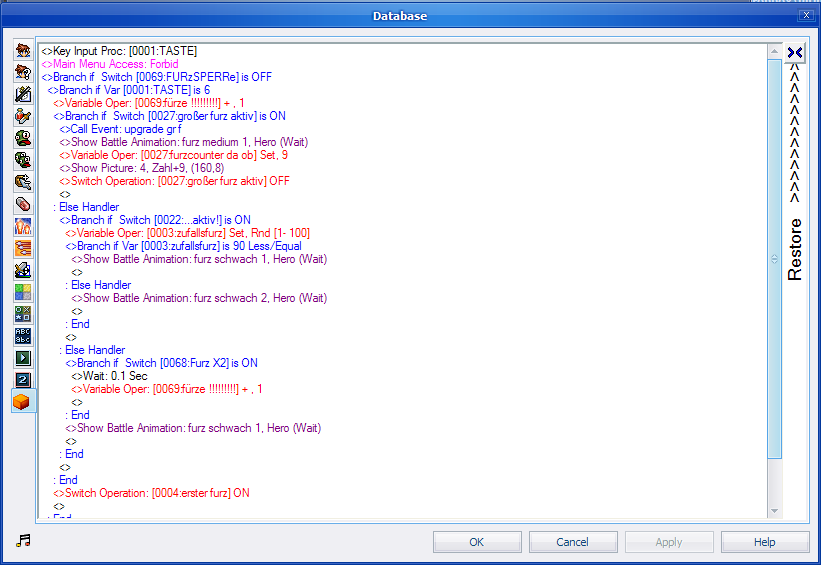
Maximized event listbox
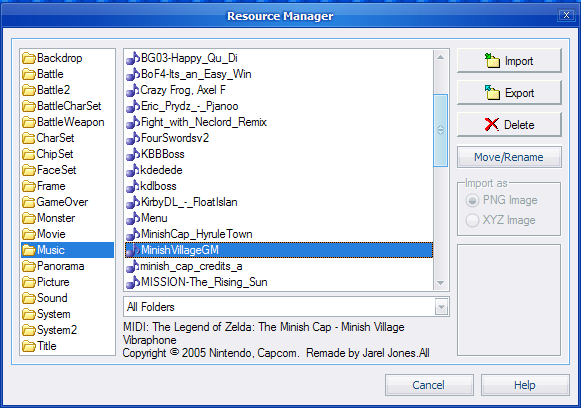
Resource manager with file info
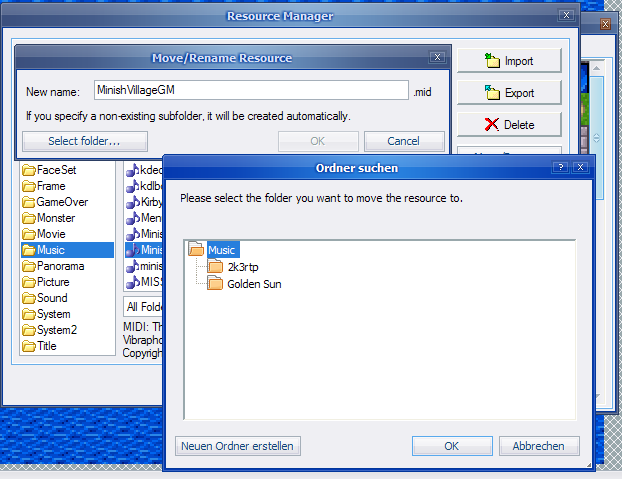
Move/rename function
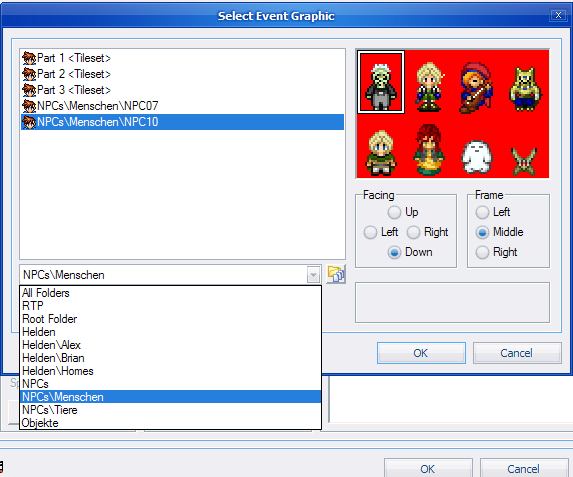
Subfolder combobox
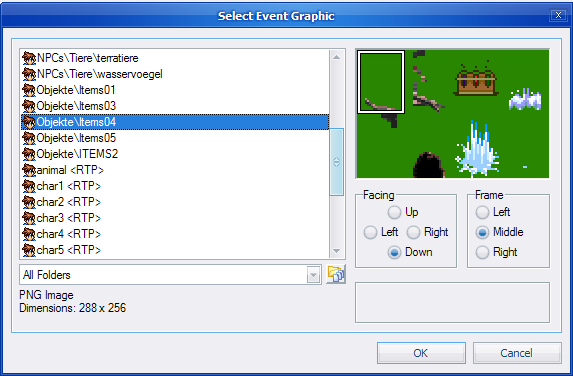
Listing of files in all subfolders
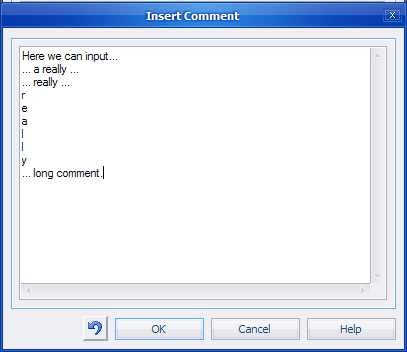
Big comment
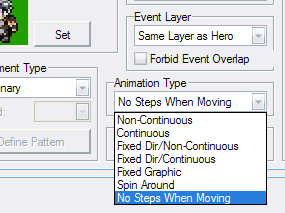
New event animation style
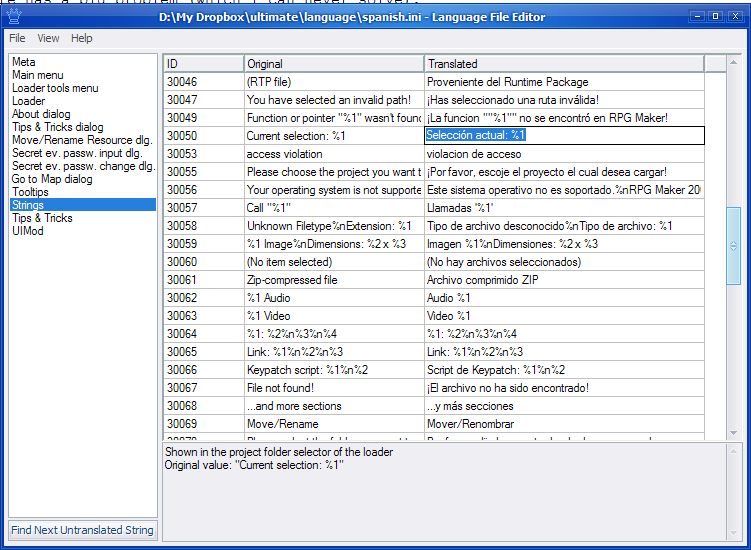
Language file editor
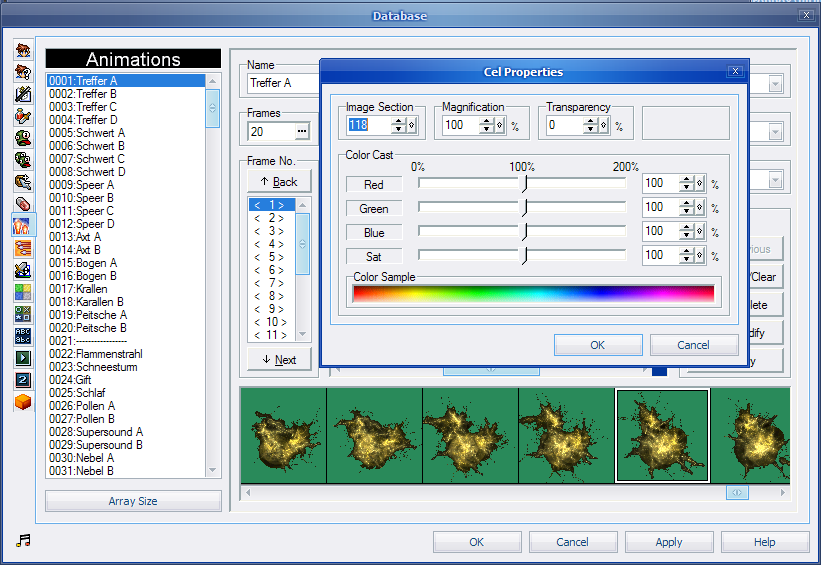
Use of an animation file with 125 sprites
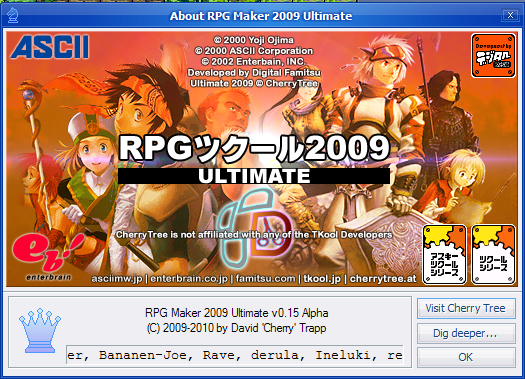
About window
Download
The first official release is available here: RPG Maker 2009 Ultimate v0.15. Please read text files carefully before testing. You can view the changelog before downloading.
Update: The last version (which never came out of Beta but has several bugs fixed) is actually 0.16.32 and can be found here.
176 Responses to “RPG Maker 2009 Ultimate”
-
DebugMaster says:
2010/02/02 at 20:16
Please Guy ANSWER ME!
Please.
-
Orochii says:
2010/02/04 at 2:00
Excellent work Cherry! I will make some testing with your “not-official” testing realease, if I encounter any bug I will report it to you
 .
.It looks great! Good luck,
Orochii Zouveleki -
X-Tech says:
2010/02/13 at 15:03
Work on it young master !
-
DNA says:
2010/02/21 at 2:41
This is the awesomeness of the fucking year.
Cherry is officially the most awesome person on the freakin’ earth.
-
mellytan says:
2010/02/27 at 0:40
Cherry > Don Miguel
Haha seriously, really amazing work. Even just the interface modifications make this worth using. The most amazing part: no more yen sign. Rofl so ein geiles Projekt!!
  D
D -
Rave says:
2010/03/11 at 13:59
DNA said: “This is the awesomeness of the fucking year.
Cherry is officially the most awesome person on the freakin’ earth.”
No, Cherry is officially the most awesome person in the freakin’ universe!
Cherry, send me for test about openSuSE version of rm2k9 Ultimate at rave002@o2.pl, please.
-
Neok says:
2010/03/24 at 21:53
Pretty impressive stuff. I’ll have to check this out.
-
BobFrank says:
2010/04/25 at 2:56
In Event Factory, is it possible to find and replace variables? That’s the only thing I’d want to use it for, unfortunately.
-
Cherry says:
2010/04/25 at 16:11
Yes, but limited. RMEventFactory has no idea what value is a variable’s ID and what is something else. So you can only say “replace 413 with 775″, but this will not only replace “<> Change variable [413], 20 set” with “[775], 20 set” but also “<> Change variable [20], 413 set” with “[20], 775 set”.
-
p3k10 says:
2010/05/16 at 3:27
Dude, I’ve downloaded it and I’m looking through it now. You are going down in RPG Maker history, right next to Don Miguel.
All your patches you’ve made and all the tools…..i fuckin love them!
You are da man! -
SGCN says:
2010/05/21 at 0:55
Hey Cherry, couldn’t have made my CBS without your awesome patches. I will be watching this very closely.
-
world cup 2010 betting lines says:
2010/06/15 at 7:51
Great job! THANK YOU!
-
kridonline says:
2010/06/21 at 15:59
XD
Thank you for it
-
kindred says:
2010/08/15 at 7:05
is this still being worked on? Theres some serious potential here hmm might re-inspire me to actually finish my game lmao. been at it for 5 yrs, and still on chap one. too many custom systems on crippled software :/,
good job, hope you keep it up
, thanks for wat youve done already -
2010/08/15 at 16:58
Of course!
There will a new release soon, introducing the “resources in subfolders” feature and more.
-
Pixelex says:
2010/08/23 at 10:42
Sehr gut Cherry! Wusste garnicht, dass du “the most awesome person in the freakin’ universe” bist. xD
An der Optik kann man eventuell noch ein wenig was drehen (Icons) und das frei fliegende Fenster, da wäre es schön, wenn man das an den Ecken der Karte oder so andocken lassen könnte.
Ich persönlich mag diese freistehenden Objekte nämlich nicht. Das ist natürlich Geschmackssache. =) -
2010/08/30 at 4:11
Hello there!
Glad to see you release another version! The added changes are very much welcomed.
I was wondering would it be possible to have the tool panel tabbed? For example having the map tree and chipset editing on two separate tabs? I’m not sure about others but I find it cumbersome when doing mass map editing to have to move the middle divider up and down to maximize the viewing of the map tree or the chipset editing. If its required for people to know what map they are on in the chipset editing tab a simple label should do.
I also noticed that if I middle mouse click (on the mouse wheel) the toolbar reverts to the original stock toolbar (on rm2k3).
But anyway thanks again for your hard work
-
2010/08/30 at 12:24
Thanks for your report.The middle mouse button bug will be fixed in next release, the tool panel tabs are a great idea, I will try to add this feature too!
-
Taylor says:
2010/10/01 at 1:29
Resources in sub-folders.
Resources in sub-folders.
Resources in sub-folders.
sdfgfssd YES
… though now I feel like the modifying of RM2k and RM2k3 I’ve been doing will be needless because this’ll turn out so awesome I’ll be using it instead.
-
kdb424 says:
2010/10/21 at 18:43
This is an amazing tool. I can never go back to 2.3 like it was. In the middle of the project, and I have all of the devs using this. Thank you so very much. Only request is if possible separate the map and chipset panels (I am not usually the mapper, so I only need the map list, ect). Thank you so much for your hard work. I may never move to RMXP with this.
-
2010/10/22 at 6:51
Only request is if possible separate the map and chipset panels (I am not usually the mapper, so I only need the map list, ect).
Right! And I already implemented this feature, together with many others, like colored event command highlighting, maximizable script listboxes, support for 125 sprites in an animation file (instead of 25), etc. – Version 0.15 will probably be released next week.
Best regards,
Cherry-
2010/10/23 at 5:02
I just dug deeper into your project, outside of the testing realm and found how powerful it really is. I had no idea that there were simple INI files that were controlling some of it. I have started making a few changes to test, and I have to say your work is brilliant. If your ever looking for testers I’d gladly contribute. And to think I was going to start ripping it apart further, when the work has already been done.
-
2010/10/23 at 6:52
Though I did find an issue possibly. I am changing the events window around for fun, and I can not change the width of the command box (Assuming I guessed right and it’s ListBox1.Width=703). I got it to move and everything, but it refuses to resize by width.
-
2010/10/23 at 11:28
Thank you!
I >am< looking for testers. I wrote you an e-mail with further details.
About the ListBox1 issue: That’s because the script listboxes are a special case. The RPG Maker uses them as placeholder – when the window is created, a new control is created at the place where ListBox1 was.
In the newer versions of RM2k9U, I gave the special, new script list box control a name too: ScriptListBox.
So you would then have to move ListBox1 AS WELL AS ScriptListBox (that’s necessary, because rightclick only works at the place where the invisible ListBox1 is).
Best regards,
Cherry
-
-
-
-
-
X-Tech says:
2010/10/27 at 1:52
How Long to premiere ?
-
2010/10/27 at 2:04
Just waiting for the last translator to finish the work
-
-
JudgmentTH says:
2010/11/14 at 23:36
Question. What’s the number of pixel lengths and widths to import large animation files?
-
2010/11/14 at 23:45
Up to 480*2400 for “Battle” files or 640*3600 for “Battle2″ files.
-
2010/11/15 at 0:13
I see, thanks.
-
Seena says:
2010/11/15 at 23:43
Ideas for some new features in Rpg Maker 2009 Ultimate:
–The “Key Input Processing” event command should should process all keys on the QWERTY keyboard (Instead of the user hoping that he/she used “Powermode 2003″ properly).
–Base statistics should be able to go beyond 9999 (For those who want characters and enemies in their game to get really powerful).
–A simple graphics editer built in so users can build sprites, tilesets, and other images.
–Support for Floating Point Variables along with additional variable operations and functions including Square Root, Power and Exponential Functions, Natural and Common Log Functions, all Trigenometry and Inverse Trigenometry Functions (including Hyperbolic Trigenometry), and a Rounding Function.
–Allow the user to encrypt all resources when using the installer creater (Create Gamedisk) function so when sombody plays the game he/she won’t have direct access to all of the resources if the creater of the game wants the resources to be proteted.
All of these features would make RPG Maker 2000/2003 much better and more flexible.
-
2010/11/16 at 8:46
Everything except the graphics editor is at the wrong place here^^
RPG Maker 2009 Ultimate modifies the editor, not the game engine.This would be CGSS‘ part.
-
2010/11/16 at 23:30
Got it! I will make sure my suggestions are valid.One more Idea: Map sizes greater than 500×500 allowed if sombody wants to create HUGE maps in their game.
-
2010/11/17 at 7:59
That’s no problem:
[FormEDMap]
DialEdit1.MaxValue=10000
DialEdit2.MaxValue=10000
Put this code in an *.ini file and put it in the “uimod” folder. Then, register the file in the configuration file (ultimate.ini), at section “[Interface]“.
-
2010/11/17 at 18:02
Thanks. I tested it and it really works.
For those who intend to have very large maps, never make any maps larger than 6500×6500 because otherwise rm2k/3 will use more memory than allocated to it and generate a nasty error. 6500×6500 should be enough for anybody’s game.
-
Alucard says:
2010/11/17 at 18:51
Man its perfect ! I must say it it’s just perfect !
Please keep it up !I love it !
Thanks, Alucard !<3 -
2010/11/17 at 22:30
Hey cherry, glad to see your still working at this
, ive downloaded it but I am on linux right now. I’ll check it out in a bit. Just wanted to say thanks again and please keep it up -
2010/11/18 at 9:19
It’s working with Wine too^^
If not, read wine.txt.
-
2010/11/22 at 6:41
Wow you’re right it does work under wine too. I’ll give you a proper review later next month (windows and linux), I’m at uni at the moment unfortunately.
tc
-
-
Lucca says:
2010/11/18 at 23:31
Hello, Cherry.
First, let me congratulate you for the update, it´s really marvelous.
But I have a little doubt, I explain:
I´m using the spanish translate version of 2k3 (1.09a) and when I tried to patch the project, it sends me a message saying that the executable isnt a 2k3 file. So I´m not secure if that´s for the version, or is just a problem of mine. I´ve been looking at the readable files, but i hadnt found anything. Also, i have trying another versions of the program. It works with 1.05 but not with 1.08, at least in my computer. So that´s my doubt: It´s for the version or is another kind of problem? And, if it´s the second: Do you know any way of fixing it?
Sorry to bother, and sorry if there´s some work that sound strange. And thanks. ^.^
-
2010/11/19 at 0:00
That’s a known issue, it’s because your executable file is probably called RPG Maker 2003.exe instead of rpg2003.exe. Solution: specify full path to it in ultimate.ini (quite at the bottom).
-
2010/11/19 at 0:33
Well, I´ve been trying it and the problem remains. The file is named correctly (RPG2003) but I tried to specify the path and it doesnt work. The exact error message that it gives is “The executable file doesnt belong to RPG Maker 2000 or 2003!”
Could be another reason for that to happen?
-
2010/11/19 at 7:43
Yes, that your rpg2003.exe is not the RPG Maker 2003, but something else, but this is very unlikely
Could you please start RM2k9U in debug mode, and when the error message appears, tell me what’s in the black area below the splash screen?
-
2010/11/19 at 15:07
Yeah, really unlikely, specially because I have been using it for some years I think I should have already notice sometime xD
Well, I let it detect the route of the program, and when it start in debug mode, appear the flollowing:
“App Path: C:\Program Files\Enterbrain\RPG2003″
“App Cmd: C:\Program Files\Enterbran\RPG2003\RPG 2003.EXE”
“Starting…OK”
“Checking Mutex…OK Instance ID: 0″
“Scanning Memory…OK”And then, the error message appears. I also try with different routes and these kinds of thing, but the result is exactly the same.
-
2010/11/19 at 21:13
Interesting – normally, this can only happen when your rpg 2003.exe really isn’t a RPG Maker file…
To check that, RM2k9U checks for the string “TFormLcfBase” in the file.
Please send your rpg 2003.exe to me so that I can check it. Please upload it. You don’t need to post a link, if you don’t want to (because you would be illegally publishing commercial software), just tell me that you uploaded it, because I am the admin of CherryShare and thus able to find your file.
-
2010/11/19 at 23:23
Okay, thanks for your e-mail.
The problem is: Your rpg2003.exe is packed with UPX, so it’s basically not a normal RPG Maker executable.
You have to unpack it: http://www.freeware-download.com/downloaddetails/3693.html
-
DebugMaster says:
2011/12/16 at 21:28
Cherry, can you post RM2k3 executable. Or recommend a link.
-
2011/12/17 at 16:28
Sorry, I can’t do that, because of the Copyright (the rpg2003.exe is basically the RPG Maker itself, so I would link to warez, which I don’t want).
Just google it, please.
-
-
-
2010/11/20 at 1:00
Now it´s running perfect, thanks. Maybe you should put a note on the description of the update, because I think the 2k3 version I was using, it´s the same that all the spanish makers use (If they use the translation, obviusly)
And, one more time thanks (I think thats too much thanks, but your work deserves ir xD)
-
2010/11/28 at 20:40
I look forward to your next release. You really are doing awesome at this! When will the next release be and what new features will it have?
-
2010/11/28 at 20:51
Sorry, I can’t tell yet, because I have so much other work to do, mostly for school.
-
2010/11/28 at 22:55
Okay!
-
-
-
2010/11/30 at 1:02
I think this is a glitch? Once I change the name of “Armor” in the String tab and after leaving and then going back to the tab, it resets to Armor…
-
2010/11/30 at 10:07
Interesting… I’ll investigate that. Thank you.
-
-
Patrick says:
2010/11/30 at 5:09
Is it possible to get all the keys on a QWERTY keyboard to be functional? Instead of having Z, Space AND Enter be the decision, and X, and Esc be the Cancel, have Space be the decision and Escape be the Cancel? It would make my game easier, as I have a sword, shield and several other items available for use, and I’m trying to set it up like Zelda, with Z being the sword and X being a weapon that is changeable, BUT, then my menu needs to be brought up with a silly key, like 0 or something.
Maybe have it be Q=27, W=28, etc?
-
2010/11/30 at 10:07
You can use Power Patch Compact to change the key assignments, or when it’s finished (probably in some weeks), RM2k3 Revolution Patch too.
-
-
2010/12/01 at 17:19
What’s the RM2k3 Revolution Patch?
-
2010/12/02 at 9:53
That’s a “revolutionary” patch for RM2k3 I am currently developing. More info will come when the patch is finished.
-
2010/12/02 at 21:29
That’s very interesting!
-
-
-
Lance says:
2010/12/03 at 19:00
That’s an unique project. One word; “awesome” …
Keep it up mate. Eyes on you
-
Demon Lord says:
2010/12/09 at 17:38
Just an awesome project
Good luck on this.
But i have weird bug on it. In my rm2k3 game i have changed “Armor”,”Load Game” words on another things. But when i opened game i saw they aren’t changed.-
2010/12/09 at 20:44
This is a strange bug, I am already investigating the cause…
Because some words (like “Yes”) work, others (like “Armor”) don’t.
-
-
CM says:
2010/12/09 at 23:43
Hi Cherry. I want to download RPG Maker 2009 Ultimate, but I really only want it for a couple of its features. Is it possible to turn off the additional features, or even turn off all the features? And can the patch be easily retracted?
I am really impressed with your work! Thank you.
-CM
-
2010/12/09 at 23:49
It’s no patch at all, it doesn’t modify your RPG Maker on your harddisk. It loads the existing RPG Maker and modifies it in the RAM, so there is no need to undo any changes when you want to remove RM2k9U.
After installing, look into the “ultimate.ini” file. You can turn off many features there or customize them.
-
2010/12/10 at 22:56
Thanks Cherry. I will do that.
-CM
-
Kizai says:
2010/12/12 at 11:12
Hello Cherry,
I’m really impressed! I have only one question,
after i created a gamedisk and opening the installation setup
the setup shows only ????? symbols. So on the install button instead
of the word “Install” it shows “???????” Is there a way to change that?Thanks and keep up the good work! XD
- Kizai
-
2010/12/12 at 11:42
That’s not RM2k9U’s fault, it happens with your normal RM2k(3) as well. It’s because the setup program is Japenese. Because in many points, the gamedisk isn’t the best solution, I’d suggest to create a self-extracting archive with WinRAR instead.
-
-
Dart00 says:
2010/12/13 at 1:31
Wow…Great work? But how stable is it?
Also does it support your ppp v2 patch? Or does it “absorb” all the patches that we have made to our project file before?
-
2010/12/13 at 12:37
Although it’s called “Alpha”, it’s very stable, as far as I can tell. I didn’t get any instability reports yet.
It supports every version and every patch, because RM2k9U itself is no patch and doesn’t change your project’s rpg_rt.exe.
-
Dart00 says:
2010/12/13 at 21:16
Ah. I see. I LOVE the syntax highlighting. I would be very very nice though to have a “testplay” button in the database window by the mini button or something though, its so annoying to have to make a tweak and close the database, open test play, finish test play, reopen database, continue…
Also maybe a tweak to make the drop down boxes like 3 times there size, so much scrolling if we have A LOT of stuff.
Also I love the idea of sub-folders, but I already have 100s of graphics already put in my game, and when i tried to sub-folder a few of them the game crashed saying it could not find the resource, that stinks lol. I wish there was a way to be able to sort my graphics and like a “Recursive Synchronize” button that updates all the graphics in game to there new paths. Till then I am unable to use the sub-folder option.

But Great work! Cant wait for the next release.
-
2010/12/13 at 21:47
I would be very very nice though to have a “testplay” button in the database window by the mini button or something though, its so annoying to have to make a tweak and close the database, open test play, finish test play, reopen database, continue…
RPG Maker 2009 Ultimate allows the test play hotkey (F9) in the database as well.
-
-
-
-
Nessy says:
2010/12/18 at 16:34
I was wondering, will you include map exporter as well for easier atmospheric pictures? :3
-
2010/12/18 at 17:33
These things will follow later
-
-
Magi says:
2010/12/23 at 20:58
Hey. I can’t figure out if it is my computer or version 0.15, but I am unable to create more than three lines of text in the show message dialogue box. If I format dialogue in RM Text then manually paste it in, I can utilize all four lines, but otherwise it is impossible. Is this a known issue?
-
2010/12/24 at 15:06
This happens when the original RPG Maker used an odd small font.
Please open the file “widemessagebox.ini” in the folder “uimod” and change all occurences of “++16″ to “++32″.
Best regards and merry christmas,
Cherry-
2010/12/24 at 22:10
Awesome stuff, thanks much for the tip!
-
-
2010/12/24 at 23:15
Hey Cherry,
Firstly thanks again for doing this. I will definitely make a donation to you once school is finished for me, I’m at uni right now so cash isn’t exactly a luxury lol. I also noticed you implemented the tabs for map and chipset editing, it looks great thanks
. I certainly enjoy the idea of colour coding the code in the system, this should make debugging easier. I can’t recall if this was in the previous version but I noticed that for the database you replaced the tab words with icons for navigating the database. I wouldn’t recommend this, tt looks ok in the drop down menu list but for actually navigation it can be somewhat cumbersome remembering what icon means what. Instead of clicking once on my intended tab I can find myself clicking up to 3 times trying to recall which is the correct one.But here’s my review for Linux and Windows.
Linux:
Kubuntu 10.10: Wine 1.2.2-Rm2k9 opening very slow, takes up to a minute to open (most likely due to wine). The main window opens then quickly disappears only to reappear after some time (I think this behaviour might be normal since you are using dll injection and that the process is just slower under wine than windows). If I minimize the window I will get duplicate windows, one window will be the normal rm2k9 window and another will be a window which I cannot interact with (only the 3 main buttons min, max, close). This might be just incorrect handling on wines part.\
-Map decoding is also very slow (for scrolling too).
-during test play there are no midi sounds, and sounds (.wav) stopped playing after several minutes (mostly due to wine, i noticed this while using AIMP audio player too).
-On the laptop during test play the top menu bar for the test play window disappears (I don’t have any minimize, maximize or close buttons). This isn’t a problem on the desktop though. So I’m sure what’s happening there. I’ll just blame wine
-During test play if I close the caption box to allow myself to edit while playing, the test window still forces focus on itself regardless of what I am clicking on. I am pretty sure this “edit while playing” functionality was from the rm2k3 version I had, so I believe this is something you had not coded in yourself and I am unsure if there’s any way you can override it to make it work in rm2k9 with or without it being native to the original rm2k3. I see only a slight slow down when animations are being used for the first time, once those are cached it’s fine. I see something similar on windows, although not as apparent.
-The font in the tabs are some what messed up, they are not aligned in the similar fashion when rm2k came out with the hideous font. I don’t recall seeing this problem on the laptop, however I don’t recall doing anything different in terms of set up for rm2k9.-When I attempt to enter the database I get an exception. It says the following:
“An exception occurred while the window “FormEDCommonEvent” was initializing. The window might not be fully working. You should save your project and restart RPG Maker 2009 Ultimate as soon as possible to avoid further errors. Access violation at address F74C579A while writing to address 00679CF0.”Windows 7:
-No problems in opening rm2k9, map decoding or scrolling.
-moving the tool bar is vary slow and laggy.-Aside from aesthetics, I can’t really say I have any complaint on the windows side of things. It appears to be very solid. As I use it more I’ll post back if anything comes up.
-I also did a quick run through on virtual box with windows 7 and everything seems to be the same on actual hardware. I only had no sound but that was a problem with my virtual box that I’m rather lazy to fix.
Another future idea (tabs again woop) might be to have an event tab. One that lists all events on the map by name. The setup would most likely be similar to how the common events look in terms of layout. These ideas are more or less just for practicality than necessity. It could have sorting by name and by event number aswell as an option. I was originally thinking of this idea for common events, but I think it might be more appropriate for map events, it’s up to you really. I suggest this since alot of my game sequences are controlled by events, i’ve event worked out a way to use events as “switches”, like if this event facing down, do this, face up, etc. I only say this to give you an idea as to how others might use events outside of the norm.
But that’s about it for my review. Hope it helps and enjoy your holidays
-
2010/12/26 at 3:39
Ya, the buttons were driving me crazy! lol. But there’s a option under “settings” (We may get a GUI soon) that you can tweak (Just read everything carefully) that you can reset it back to tabs.
-
2010/12/26 at 15:15
First: Hello, thanks for your review and happy holidays!
I can’t recall if this was in the previous version but I noticed that for the database you replaced the tab words with icons for navigating the database. I wouldn’t recommend this, tt looks ok in the drop down menu list but for actually navigation it can be somewhat cumbersome remembering what icon means what. Instead of clicking once on my intended tab I can find myself clicking up to 3 times trying to recall which is the correct one.
As Dart00 said, you can change that behaviour in the ultimate.ini file (File->Settings). The option id vsllrf “DataBaseTabsStyle”. The value “0″ will show the tabs as usual, without icons, and if there is more than one row, it can switch its position. The value “1″ will add icons (without removing text) and change the style to something button-like which will not switch its position when there is more than one row. Finally, “2″ results in the behaviour you see now: Vertical tabs, icons only.
About all your problems with Wine: I am using a lot of tricky stuff on a low level to get everything working. Unfortunately, Wine doesn’t like this. Although I am trying to make RM2k9U as Wine-friendly as possible (read wine.txt), there are still some problems on some machines which I can’t solve from my side.
On openSuSE 11.2 with the latest Wine version, everything is working fine, but on Ubuntu, it’s extremely slow, for example… So I am at the end of my knowledge at that point.
-When I attempt to enter the database I get an exception. It says the following:
“An exception occurred while the window “FormEDCommonEvent” was initializing. The window might not be fully working. You should save your project and restart RPG Maker 2009 Ultimate as soon as possible to avoid further errors. Access violation at address F74C579A while writing to address 00679CF0.”This one of the worst things that can happen, because I have absolutely no idea why this error occurs. It can make the Common Event tab practically unusable, because some vital things may not work – you have to try it. The problem is that I can’t find out the problem without access to your machine, because it doesn’t occur at my computers…
-moving the tool bar is vary slow and laggy.
Is your system 64 bit? If yes, that’s an known issue which seems to come from the 3rd-party window docking library I am using, and it only occurs at 64 bit systems. I haven’t found a way round yet.
Another future idea (tabs again woop) might be to have an event tab. One that lists all events on the map by name. The setup would most likely be similar to how the common events look in terms of layout. These ideas are more or less just for practicality than necessity. It could have sorting by name and by event number aswell as an option. I was originally thinking of this idea for common events, but I think it might be more appropriate for map events, it’s up to you really. I suggest this since alot of my game sequences are controlled by events, i’ve event worked out a way to use events as “switches”, like if this event facing down, do this, face up, etc. I only say this to give you an idea as to how others might use events outside of the norm.
The reason why this isn’t implemented yet is because I haven’t found the right way to read the map event data yet.
Best regards,
Cherry-
2010/12/29 at 21:37
Hi,
Did you install anything besides the latest wine, like for example any winetricks?
I’ll see if I can get an idea of the problem with the common event tab.
And yes I do have a 64 bit system.
I read some info on other rpg maker projects long ago, and I think they might have information on map decoding.
Rpg-Minerva
http://r-pg.emubase.de/site/index.php?s=news&lan= , the project is discontinued though.EasyRpg
http://easy-rpg.org/wiki/easyrpg-documentation
http://easy-rpg.org/blog/Hope that helps.-
2010/12/29 at 21:47
Did you install anything besides the latest wine, like for example any winetricks?
Yes, winetricks “msi”, “msvcrt” and “msvcr80″, because this was needed in previous versions of RM2k9U.
I’ll see if I can get an idea of the problem with the common event tab.
Please try the tips in wine.txt! Maybe it helps.
I read some info on other rpg maker projects long ago, and I think they might have information on map decoding.
Yes, I know all of them, and decoding the files is not the problem. I am talking about the classes in the memory.
-
-
-
-
GR-FoxDie says:
2010/12/26 at 21:25
Einfach nur klase der Maker.
Hab ihn grad getestet und bin begeistert von deiner Arbeit.
Ich würde sagen bleib am Ball und weiter so ist auf jedenfall ne super sache.mfg GR-FoxDie
-
Rudria says:
2010/12/27 at 6:31
Cherry can you combine rm 2009 ultimate with cgss and can you create triple layer mode like rm xp, if you can it’s will be the perfect rpg maker
-
2010/12/29 at 21:44
Sorry, I can’t change the amount of layers.
-
-
Gerb says:
2011/01/11 at 17:26
Hi Cherry! I have one question. Can be expanded Move Event? It has two items “go to the hero” and “go from hero”, but somehow the developers have not figured to make the team “to go to an event № …», which is sent to the event from point A to point B, from one event to another. I explain why is needed. I do in my project «Day and Night System» and day NPC walk around town and at night should go home, but as they walk randomly, to prescribe the route to the house I can not. And if there was a point “go to an event № … », it would not have been much difficulty. Is it possible, at least theoretically, to make this?
Thank you)-
2011/01/11 at 19:22
Everything is possible, as I use to say. And yes, I would even know a way how to create such a patch, it’s still no pathfinding – the “Go to hero” function can’t avoid walls, etc. either.
I’ll write this down and include it in my latest patch when I get to any time…
-
2011/01/11 at 20:14
Thank you very much and good luck, Cherry!
Russian fans will not forget you! -
2011/01/14 at 23:03
Maybe if the NPC bumps into a wall or gets stuck maybe the npc can trying moving another direction or going back a step or 2 and try again and try to make a “logical map” of its surroundings to get to where it needs to be?
-
2011/01/15 at 10:39
Well, you would need a A* pathfinding algorithm, which is not that easy.
-
-
-
-
2011/01/12 at 1:50
RM2K9U would be very useful if other patches were included like Hyper Patcher or Event Factory.
-
2011/01/12 at 7:47
Integration of RMEventFactory is one of the nexts steps, however, at the moment it lacks the support for localization.
-
-
brother pe770 says:
2011/01/19 at 5:28
Hii found your site through search engine.
i like your web page content and very attractive theme.really i like this it.
Thanks.:
-
Magi says:
2011/01/26 at 21:12
Hey Cherry, there is something I just thought of that I’m curious about. Are there any plans for 2K9U to have any GUI extensions for people using your patches?
Something like being able to select from a preferences menu which patches have been applied to your RPG_RT file or the program could even detect it automatically… Then it could add several boxes and buttons to create a friendlier interface for things like the picture pointer patch or an extra database tab/event button to quickly change controllers in the future revolution patch.
-
2011/01/26 at 21:19
Well, yes, that’s planned… But: There are so many things planned, and I have no idea when – or whether – I will be able to do these things…
-
-
Kellen says:
2011/02/02 at 22:03
Hey Cherry! This looks like an amazing upgrade to rpg maker, and would love to try it out. But when I attempt to load the project from the folder I get an internal error or something and that rpg maker had to be closed
and exit code C0000005 (Access Violation).I tried running it in Debug mode and the error appears to occur when it attempts to load rpg maker 2003 (i have v1.08 btw), it rm2k3 crashes or stops working and i get the same internal error except with exit code FF.
I was hoping you may have some insight to the issue, is it rpg maker 2009 or do you think it may be my rpg maker 2003? (which is what it seems like)
-
Sleeping_Wind says:
2011/02/03 at 8:45
Hello, nice project you have here!
I am wondering if it is all right to give a few suggestions to the engine (also I want to ask if you can tweak these few things) – these are some of the stuff I think Rm2k3 can be improved on:
\1. Changing Class graphic in battle (instantly applied?)
\2. Ability to set stat value to x instead of adding/reducing it -x +x
\3. Ability to change resistance/reduce stat like in SMT series (perhaps by “level”) so stat change skills is more strategic
\4. Changing class while maintaining battle graphic (instead of making duplicate of class just to change resistance).I apologize if these are pretty long shot/far fetched. I will keep an eye on this work of yours.
Thank you for your time!
-
Jay says:
2011/02/05 at 21:37
Hi,
We read the ultimate.txt for some details for the lower layer tiles and wanted to say thanks because my son and i were looking for that info.
Thanks again.
-
CRxTRDUDE says:
2011/02/11 at 15:23
I got a very nice find here! Thanks for this app! It’s more streamlined than the other ones! BTW:
How can I find out if what I’m using is the value pack (for RPGM2k)?
Are you still updating this program?Thanks again!
-
Pikachu127 says:
2011/02/18 at 2:27
Can you close this in another file other than a RAR? I don’t have the capability of unzipping it, and I can’t download winZIP, so… Help, please.
-
Arun says:
2011/02/20 at 18:15
Uhm hello !
It’s looking cool, but i can’t even get it work.When i choose my project on the Rpg Maker’s locations.
It says: “Starting Rpg Maker failed.” and something “Update is needed for processing.” sorry because it was written in my language.-
2011/02/20 at 18:18
Okey okey i got it ! I am using Windows 7, i am running it as administrator, and it’s perfectly working !Thanks for this great software Cherry !
-
-
2011/02/28 at 5:37
Here are some ideas for RM2K9U:
The “Show Message” event command could allow for the display of a characters Hp/Mp/Attack/Defense/Intellect/Agility or Equipment slot or character Class/Title the same way Variables or Hero Names can be displayed.
The “Show Choices” event command could allow for more than 4 choices.
-
2011/02/28 at 7:52
Thank you for your ideas. Unfortunately, these things can’t be done in RM2k9U, since RM2k9U doesn’t modify the game engine (and isn’t supposed to do that either). Only features which don’t require modification of the game engine (rpg_rt.exe) can be done in RM2k9U.
(For example, the subfolder feature is using backslashes in resource names. When the game engine accesses these files, it will access a file in a subfolder without even knowing it.)
-
-
Zantara says:
2011/03/13 at 16:59
Any updates or progress about RM2k9u Cherry ?
Btw this is great… -
glorimus says:
Shallom Cherry !!! Cherry i found a battle algoritm software in the RM2k9U folder that i think useful, but why not you add more useful tool like charas maker, zorn tool, etc.
And can you create the sub menu like tools-charas maker or tools-zorn tool, or etc.Ah yes, i know you have a lot of work in the real life (finishing school) but i hope you can finish the next update version of RM2k9U+CGSS, ’cause i really need the CGSS. One more think, god will bless you for your work cherry !!
-
Anonymous says:
2011/04/21 at 9:06
Man, you have no idea of how much this nifty tool helped me.
I don’t know why rpg maker doesn’t support subfolders natively! This definitely saved me there.Thanks!
-
_aLucard says:
2011/04/25 at 10:44
Hello. Your software is great! But why I’m getting an application error and it says:
“The application failed to initialize properly(0xc0150002)…”
I’m using Windows Xp.
Thanks in advance.
-
2011/04/26 at 15:26
That’s a strange problem some people have. It means that Windows can’t find a certain module (”assembly”), but strangely it doesn’t tell you which module. However, Windows creates a message in the event log (use Control Panel → Maintenance → Event Log to view the log). Please tell me what’s the exact error message there.
Best regards,
Cherry-
2011/04/27 at 11:06
I can’t tell the exact error ’cause i can’t see it, but don’t worry I’ll be using your program on my brother’s laptop. This makes Rpg Maker 2k/2k3 get along with rpg maker xp and vx. I’m looking forward to an update.
Keep up the good work.
-
-
-
Garon says:
2011/04/28 at 11:23
Hey Cherry,
danke für den RPG Maker Ultimate! Ein kleines Problem ist mir aufgefallen: Beim Vokabular im letzten Reiter werden durch dein Programm die folgende Einträge immer wieder zurück gesetzt: Attack, Mind, Other, Equipment und Continue.
Bei anderen ists mir nicht aufgefallen – habe auch nur diesen Block bearbeitet. Lässt sich schnell feststellen, indem man jedes Feld ausfüllt, anwendet, das DB-Fenster schließt und erneut öffnet.
Wenn man die Einträge im rm2k ändert, so werden sie auch im ultimate geändert. Versucht man sie hier zu verändern, so wird immer auf die Änderung des rm2k zurückgesetzt.
Liebe Grüße,
Garon-
2011/04/28 at 18:21
Ich weiß, das Problem wird im nächsten Release (…wann immer es kommt…) behoben sein.
Bis dahin kannst du dieses inoffizielle Update verwenden.
-
-
Utopia Maker » ENGINE RPG Maker 2009 Ultimate » Utopia Maker says:
2011/04/28 at 18:50
[…] vale a pena dar uma conferida. Link do site, com informações sobre o maker e link para download https://cherrytree.at/cms/lang/en/projects/ultimate/ Posts Related to [ENGINE] RPG Maker 2009 Ultimate No Comments RSS Filed under: Ferramentas, […]
-
AML says:
2011/05/03 at 18:09
Thank you for this awesome feature.
More people in this world should be like you.
I will wait the next version impatiently.Good Luck!
-
Neok says:
2011/05/11 at 23:28
Would it be possible to include the following features?
- Option to play reversed battle animations
- Allow for larger sprite sizes for charasets? (aka, be able to put something like this:http://rpgmaker.net/media/content/users/32/locker/BigRobot.png
into one charaset, preferably with the usual 3 frames of animation.)
The idea is to make things much easier for people who want to make their own custom battle systems.
-
2011/05/16 at 17:59
- Option to play reversed battle animations
This would require modification of the game engine, so it’s not RM2k9U’s task.
- Allow for larger sprite sizes for charasets? (aka, be able to put something like this:
http://rpgmaker.net/media/content/users/32/locker/BigRobot.png
into one charaset, preferably with the usual 3 frames of animation.)
Have a look at the CharExpand-Patch!
-
-
2011/05/24 at 0:36
Hi,
Left a comment some time ago a wanted to come back to say that my son is loving the ways he can make custom battles.Thanks again for great information.
-
2011/06/08 at 0:54
Will there be a new release soon?
-
2011/06/08 at 11:32
I planned to do so, but at the moment, I am working on the RM2k3 Revolution Patch – there soon will be release.
-
-
Hiro says:
2011/06/11 at 17:09
The computer say to me that Rpg2003.exe (that I kept on my USB key) was corrupted or unreadable when I was using Rpg Maker 2009 Ultimate. Then, the corruption extended itself on my USB key and I had to delete forever 8.05 gigabytes of 14.8 that the kay has to save my USB key. Now the corruption is stopped. I used Rpg Maker 2009 Ultimate many times, but only today the problem appear. It’s a problem of Rpg Maker 2009 Ultimate or not? Can I reuse Rpg Maker 2009 Ultimate safely? Sorry if i made some grammatical errors: I’m italian.
-
2011/06/12 at 17:17
Hello! Thanks for the message.
RPG Maker 2009 Ultimate doesn’t ever attempt to write to the rpg2003.exe, so I think the file system on your USB stick was already corrupted before (probably due to a power failure or because you plugged it out without using the “Remove Hardware” features – but there can be other causes too).
-
Hiro says:
2011/06/12 at 17:50
Thanks for the answer. When the problem occurred, I reset my computer because it’s very old and it stopped to work. Then I saw that the corruption ate a lot of files (3-4-5 gigabytes) and so I use Scandisk on my USB stick. Scandisk stopped the corruption from eat another files, but it removed a lot of unreadable files. Now I have 9999 fragments of corrupted or unreadable files… But the corruption didn’t started when I turn on the computer, but after a few hours that I was using Rpg Maker Ultimate. The computer said that a charset was unreadable or damaged. Then, when I tried to close Rpg Maker Ultimate, the computer said that Rpg2003.exe was unreadable or damaged. Then it said that the project folder was damaged or unreadable (and I can’t enter it). After this, the computer stopped itself and I reset it. Why the corruption started from some Rpg Maker files of the project that I was modifing with Rpg Maker 2009 Ultimate?
-
2011/06/13 at 13:35
Naturally, the corruption gets worse on every write access. Because you were working on a project at that moment, it started there.
-
-
-
-
DarXnake says:
2011/06/13 at 1:47
Hi Cherry. I’m a french fan of you and your incredible work on RM2k(3). You’re just an amazing person! I’m using so much patch from you that saved my life more than once, that’s just insane. So I wanted to say a big ‘Thank You’ for all your hard work ! Also, is there a place where we can make suggestions or bug report for your RM2k9U ? Well, i’d like to report two litte anoying things, and will do it here for the moment:
- Sometimes (didn’t manage to know exactly why), hotkeys doesn’t open the right window. For instance, CTRL+G opens Enemy Groups in DB. CRTL+S opens Techs in DB.
- Can the windows “Search for a map” keep the last method we use to actualy search for a map. I usualy search with the map ID and always have to check “ID” then enter the number beacause name method is default.- Is it possible to integrate a “rapid search” option for event listbox (like CTRL+F) to look for a variable / switch / text ?
- The last one is off topic. It’s about your RM2k(3) Font Changer. I was unable to change a font from a brand new v1.07 RM2k exe. But for the same font, it worked on an other RM exe version (don’t know the number).
I’m looking forward to the next version of RM2k9U, and thanks again for all you already did
-
2011/06/13 at 13:39
Thank you for your message!
Sometimes (didn’t manage to know exactly why), hotkeys doesn’t open the right window. For instance, CTRL+G opens Enemy Groups in DB. CRTL+S opens Techs in DB.
This happens when RPG Maker 2009 Ultimate loses focus by Alt+Tab but later regains focus by the mouse. Use this inofficial release, I fixed the bug there.
- Can the windows “Search for a map” keep the last method we use to actualy search for a map. I usualy search with the map ID and always have to check “ID” then enter the number beacause name method is default.
- Is it possible to integrate a “rapid search” option for event listbox (like CTRL+F) to look for a variable / switch / text ?
I’ll put that on my list.
- The last one is off topic. It’s about your RM2k(3) Font Changer. I was unable to change a font from a brand new v1.07 RM2k exe. But for the same font, it worked on an other RM exe version (don’t know the number).
Looks like somehow it isn’t brand new. Try Hyper Patcher 2 instead, it supports more versions of runtime files.
-
2011/06/14 at 14:07
Well, I have to say, none of the issues have been solved.
Alt+Tab then click on the window still opens DB instead of classic window in v0.16. Thanks for noticing what trigger the issue, now I can be more precise:
“If you Alt+Tab while in RM2k9U, whatever you do after, it will activate the issue, even if you regain focus with Alt+Tab without releasing Alt (pretty useless but eh, just testing :p).
Only one manipulation solves this. Alt+Tab whereever (in or out of RM2k9) maintaining Alt and then click on the RM2K9U icon in the Alt+Tab menu (I’m using Windows 7 64 bits). In that case, the wanted window opens.Regarding replacing the font of my .exe, I already tried Hyper Patcher 2 Demo, without success. In fact, some fonts work, but not all. The one I would like (ProFontWindows) isn’t recognised with v1.07 but I really can’t understand why. If you’re interested in why it doesn’t work, maybe I can upload you an empty project along with the font on an FTP ? I’m NOT obliging you at all (wouldn’t dare ^^”) !
And thank you for adding ideas to your list surely already full.
-
2011/06/14 at 15:48
That’s strange, because I didn’t experience the problem anymore since v0.16… Does it work if you press Alt twice before pressing the hotkey?
About the font changer: Please upload your files to CherryShare, use a filename like “DarXnake Font Problem” or something like so that I can find your file easily – or just post the link here.
-
-
-
-
2011/06/15 at 0:09
Actualiy yes, it does the trick. Even sometimes pressing it once will solve the problem.
I uploaded a 7z file on CherryShare, with a .txt file to help helping me.
-
2011/06/15 at 8:23
Ok, I’ll look at it and get back to you then.
By the way, for issues like this you can just send an e-mail (use the address from the “contact” page and use “cherry” instead of “webmaster”, that’s my main address).
-
-
mylove says:
2011/06/24 at 23:09
(spam)
-
2011/06/28 at 23:06
A few days ago I have seen a post by you in a forum showing your Rm2k3 Debuggin Addon, but I can’t find the information about it, here in your website. Where can I find it?Will this Debugger be added to the new release of the Rm2k9 Ultimate? When do you think the new release will be ready?Thank you very much!
-
2011/06/29 at 11:18
I know, many of my small tools are only in forums, not here on my website, because I don’t have time to update it regularly… It’s a shame^^ I hope the day will come when I put everything I made here on my website.
About RM2k9U: This debugging addon won’t be included, because it works on project-level (needs a special RPG_RT.exe). But RM2k9U will get a different, although less powerful, debugger.
I can’t tell when the next release will be ready, because of a lack of time. Real life comes first, you know.
Best regards,
Cherry
-
-
Pang says:
2011/07/15 at 10:54
Hello Cherry,
I’ve been wondering, but does your program actually let break the limit on items and skills descriptions? I’m pretty sure I saw something like “custom menu”, but I just can’t figure it out
Maybe I’m stupid or something :/-
2011/07/15 at 14:50
Although you could increase the description length limit, it wouldn’t help you very much, because the it would be cut off ingame (too little space).
-
2011/07/15 at 15:18
Thanks for letting know. It’s a shame it doesn’t seem to be doable
-
-
-
guy says:
2011/07/26 at 13:56
when i double click RPG Maker 2009 Ultimate it soon then stops and comes up with an error saying “loading project failed c:\user\john.smith\desktop\rpg maker\”
-
2011/07/26 at 15:33
Is your project really in “c:\user\john.smith\desktop\rpg maker”, and not in a subfolder like “c:\user\john.smith\desktop\rpg maker\MyGame”? You have to enter the path to the actual project, not to the folder where all projects are inside. Also, try removing the trailing slash.
Best regards,
Cherry
-
-
2011/08/01 at 6:17
Why can there only be one password protected event?
-
2011/08/01 at 16:24
Technical reasons. Sorry, I am exploiting a special behaviour of the RPG Maker, and more than one event is not possible this way.
-
-
Crayola says:
2011/08/02 at 7:37
First, thank you so much for your work !!PLEASE !!! Can you add a multi-copy option for the variable\switch menu ? Is it technically possible ?
-
2011/08/02 at 12:52
I didn’t find a way yet.
-
2011/08/02 at 18:02
Ok thanks
-
-
-
so very sad nick says:
2011/08/20 at 7:57
will you ever be featureing a multi animation feature i need it soo bad for my game to be perfect
-
2011/08/20 at 7:59
oh and by the way i love the work you do. im personally a huge fan and trust in primaraly your abilitys only
-
-
Apple says:
2011/08/24 at 15:20
Cherry are you dead ?
Will you update this miracle ?-
2011/08/25 at 17:29
No, I am as fresh as a daisy, but am also very busy with other (paid!) stuff… I hope you understand that stuff which I get money for has higher priority than stuff which consumes a huge amount of time without giving me any return service.
Best regards,
Cherry
-
-
gadesx says:
2011/10/01 at 14:40
Its will be nice see some edits of the Menu of rpg maker,
adding some features like step counter, time counter
actually the basic menu don’t let you make anything -
afl says:
2012/01/11 at 8:43
This is a great tool and I hope it is continued to be updated. There are still quite a few of us RM2k3 users out to appreciate it!
-
2012/06/03 at 20:52
Thank you, however it looks like I won’t be able to update this project anymore… Priorities change, you know…
-
-
Yuffit says:
2012/01/16 at 5:24
Starting RPG Maker failed.
The requested operation requires elevation. Help?-
2012/06/03 at 20:54
Probably you have set your RPG2003.exe to always be started as administrator. In this case you need to run RPG2009.exe as administrator too.
-
-
mSpore says:
2012/03/27 at 14:07
Ein riesengroßes Danke an Cherry für diesen Maker, einfach ein klasse Stück Software, macht das Makern wesentlich angenehmer. Schade, dass er nicht vollendet wurde.
-
Raff_the_Math says:
2012/04/03 at 23:20
Sehe das auch zum ersten mal… und dass mSpore’s Kommentar quasi von gestern ist, ist umso bedrückender… Naja wie gut, dass ich ohnehin den RPG Maker XP für mein Hauptspiel verwenden werde! ^^
-
2012/06/03 at 20:55
Naja, vollendet oder nicht, er bietet schon sehr viel, was auch schon vielen Leuten nützt.
-
-
Bypass Sharecash And Other Surveys says:
2012/06/06 at 12:38
Thankfulness to my father who told me regarding this website, this web site is really remarkable.
-
2012/06/07 at 16:05
It’s me again. I know it’s been a while, but I’ve been working on a lot in life. Any chance you’d like me to translate it to Japanese for you? I figured it’d be a good chance to learn some more words, and I’m sure Japan would appreciate your add-on to a program that came from Japan in the first place.
-
insulation equipment says:
2012/07/02 at 6:21
I like the valuable information you provide in your articles.
I’ll bookmark your weblog and check again here frequently. I’m quite certain I will learn plenty of new stuff right here! Good luck for the next! -
2012/08/10 at 16:30
I don’t really know when will the next release happen, but can you please fix the renaming problems v0.15 has? Some of the Strings always revert back to the original terms RPG Maker 2k/2k3 has.
-
2012/12/10 at 19:55
Get the inofficial version 0.16 here: https://share.cherrytree.at/showfile-2456/ultimate_01632.rar
-
-
Chefchen says:
2012/08/12 at 12:13
Hey Cherry wär echt cool wenn du am rm2k9 weitermachen könntest
-
2012/12/10 at 19:56
Fände ich in der Tat auch.
-
-
Squeeble says:
2013/01/06 at 3:40
I’m assuming this project is still on-going? I haven’t downloaded it yet, but I really like what you’re doing. I’ve been a huge fan of the RPG Maker series since RPG Maker 95+, but I still struggle on which one I like best: RPG Maker 2003, XP, or VX Ace. Each one has aspects that are great but there are always features lacking from past versions.
This leads me to my question: VX and VX Ace allow you to set the message face graphic and display options in the same event as the message itself…I find the lack of this in RPG Maker 2003 to be rather annoying. Do you think this is something you could incorporate into 2009 Ultimate, if you ever have time to do so?
-
ABV says:
2013/04/04 at 3:56
When I try to run the RPG Maker Ultimate Patch on my project an error message appear says
Function or pointer “UpdateScriptListBox_BE” wasn’t found in the RPG Maker!
what should I do? is there some missing download in my RPG maker?-
2014/06/20 at 10:04
Some versions of RM have this problem, just try using a different version. RM2k9U is known to be working fine with English RM2k 1.05, 1.07, 1.50, 1.51, RM2k3 1.03, 1.04, 1.08, 1.09.
-
-
Dufe says:
2013/09/11 at 0:27
Hey Cherry, it would be really cool if we could inverse the grid depth in terrain so I could align battle charsets at an angle.
-
2014/06/20 at 9:02
Honestly, I am not sure what you mean…
-
-
daniel says:
2014/04/24 at 8:32
Hello. So what is this exactly? i have Rm2k3… Is this a whole new rpgmaker? or like a patch? does it have the sideview battles?
-
David says:
2014/05/20 at 17:29
You have to have the rpg maker. This is only a extension for the rpg maker 2000, RPG maker 2000 Value! and the RPG Maker 2003.
Have fun!
-
-
Izlude says:
2014/05/13 at 17:35
This looks great. But I see it still has a “planned features” section. Is this still being worked on
I’ll have to give this a try and bring some life back into some unfinished projects.I think the reason I stopped in the first place was because my games kept getting strange errors (bugs) where events didn’t exist, but restarting the game made them appear again… and they weren’t fit for release. Plus I’ve improved on my art skills, so this’ll be even better.
-
2014/06/18 at 21:11
This sounds like an event was being accessed after the map changed. After a teleport, all events – except for “Parallel Process” ones – will keep running until they reach their code’s end. Now, if such an event accesses a map event which belongs to the old map, it will either access a random event from the new map (if there happens to be an event on the new map with the same ID as the event which the other event tries to access), or crash.
Unfortunately, RM2k9U is “on ice”. At the moment, it looks unlikely that it’s going to be continued…
-
-
omar benali says:
2014/05/28 at 15:59
Why is a “Secret event”?
How it can be used?-
2014/06/18 at 17:45
It’s an event which is not visible on the map. It can only be accessed by users who open the project in RPG Maker 2009 Ultimate and have the password.
It could be used to put “secret” code inside, to prevent people from copying it… or to put anti-cheating code.
-
-
BlisterBoy says:
2014/07/25 at 9:21
Hi Cherry, do you keep developping RPG Maker 2009 ?
-
2014/08/24 at 18:11
Unfortunately not. However, I don’t consider it completely dead, I might get back to it some day in the future. I have absolutely no idea when this might be, though.
-
-
kringlur says:
2014/10/10 at 4:15
Thanks so much for making this! After using it for a while, I was trying to change the in-game font and somehow messed up this program (now it’s like the program doesn’t recognize my mouse, if I click on the screen or on the menus nothing happens). I will just re-install it but I thought you might like to know.
